
Quick answer: Pop717 account login uses the Account tab of the login window. Type your username exactly as you created it, enter your password, tick Remember password only on your own device and tap Login.
What is the Account tab?
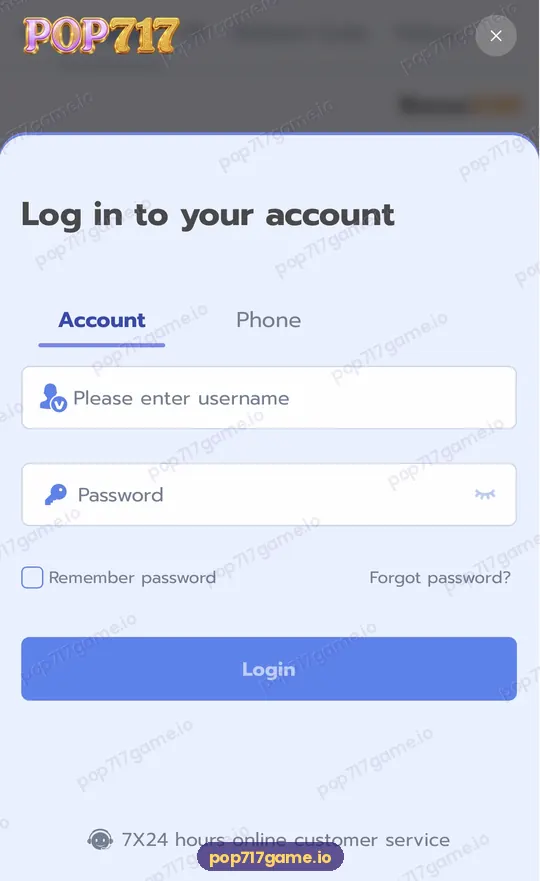
The Account tab is the default view of the “Log in to your account” window. It shows a “Please enter username” field, a password field with an eye icon to reveal the text, a Remember password checkbox and a Forgot password? link. It suits players who registered with a username. For phone-based accounts, use phone login.
Five easy username sign-in tips
- Type, do not paste. Pasted text can include hidden spaces.
- Watch capital letters. Phones often capitalise the first letter automatically.
- Use the eye icon. Reveal your password to check it before tapping Login.
- Remember password only on your phone. Never on a shared device.
- Reset if unsure. Use Forgot password? instead of guessing many times.
Account login steps
- Open the platform with the Login button on this page.
- Stay on the Account tab.
- Enter your username and password.
- Tap Login and wait for the Home lobby to load.
Account tab vs Phone tab
| Feature | Account tab | Phone tab |
|---|---|---|
| Identifier | Username | +91 mobile number |
| Best for | Username sign-ups | Phone sign-ups |
| Password | Required | Required |
| Reset | Forgot password? | Forgot password? |
What if account login fails?
Try the steps in login problem. If you forgot your password, follow forgot password. For a full overview of the platform, see our Pop717 India guide.
Frequently asked questions about Pop717 account login
Is my username case-sensitive?
Treat it as case-sensitive and type it exactly as you created it.
Can I change my username?
Usernames are usually fixed. Ask customer care if you need help.
I forgot my username. What can I do?
Try the Phone tab if your number is linked, or contact customer care with your details.
Why does the Login button not respond?
Check both fields are filled and your connection is stable, then try again.
Is Remember password safe?
Only on a personal phone with a screen lock.
Guides related to Pop717 account login
- Change Password: Pop717 change password guide: update your login from the Mine section, build a strong password, sign out old devices and avoid common security mistakes.
- Pop717 Phone Login: Pop717 phone login guide: open the Phone tab, enter your +91 mobile number and password, fix common errors and protect access on shared devices.
- Pop717 Delete Account: Pop717 delete account guide: withdraw your balance first, contact support, request closure or a break and keep records.
- Pop717 Login: Pop717 login guide: sign in with username or +91 phone number, use Remember password, reset a forgotten password and keep your account safe.
Key takeaways on Pop717 account login
- The Account tab uses a username and password.
- Type carefully and avoid pasted spaces.
- Use Forgot password? instead of repeated guessing.
Last updated: November 19, 2026